
Interlink Enterprise Connectivity Solution – WiFi 7 BE6500 Quad-Core Mesh Router with 2.5G Ethernet
R 2,065.10 ZAR
Sale price
R 2,065.10 ZAR
Regular price
R 0.00 ZAR
Please select the plug in your region, and we will provide you with a free adapter based on the SKU you have chosen.
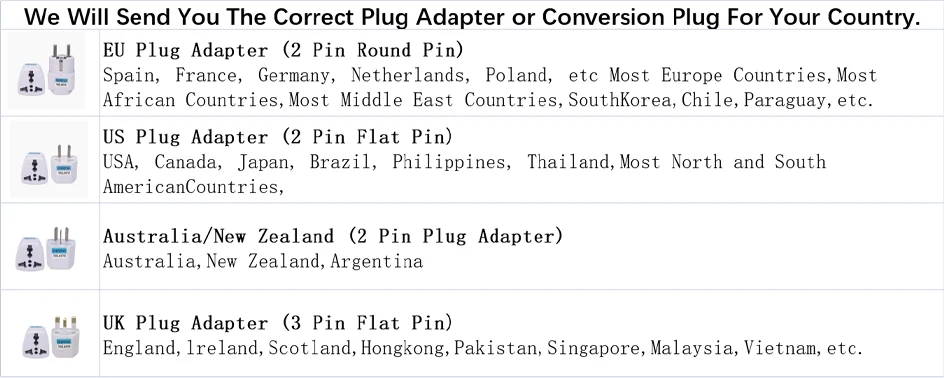
NOTE: This product version is for the China region. When adding Router, please select the Chinese server in the Mi home settings.
How to connect to Mi Home App:

Xiaomi Router Connection Steps
1. Connect the router to the power supply and connect to the network cable
2. When the indicator light turns blue, use your mobile phone to search for the WiFi transmitted by the router
3. Connect to WiFi, it will automatically jump to the setting page, and set a WiFi password according to the prompt
4. After completing the settings, the WiFi will automatically restart, and it can be used normally after reconnecting

Apparent dimension
Length width height (single)--- 318.8 x 46.9 x 242mm
Product Color--- Black
Hardware configuration
Product name --Xiaomi router BE6500
Processor --Qualcomm quad-core A53 1.1GHz CPU Memory --512MB
2.4GHz Wi-Fi-- 2X2(theoretical maximum speed up to 688.2Mbps)
5GHz Wi-Fi-- 4X4 160MHz (theoretical maximum speed up to 5764.7Mbps)
Product Antenna --6 external high-gain Wi-Fi antennas
Product heat dissipation -- natural heat dissipation
Overall interface: 4 x 10/100/1000/2500M adaptive WAN/LAN port
Indicator light --1
System reset button --1
Power port --1
Mesh keys --1
Protocol standards -IEEE 802.11a/b/g/n/ac/ax/be, IEEE 802.3/3u/3ab/3bz
Wireless parameter
Wi-Fi bands - dual-band, 2.4GHz and 5GHz
Wireless channel
2.4 GHz channel: 1,2,3,4,5,6,7,8,9,10,11,12,13
5 GHZ channel: 36,40,44,48,52,56,60,64,149,153,157,161,165
Software parameter
Operating system --MiWiFi ROM
Wireless security -WPA-PSK/WPA2-PSK/WPA3-SAE encryption, wireless access control (black and white list), SSID hiding, intelligent anti-fouling network
Management application -- Support Web, Mijia App (Android &iOS)
Working environment
Working environment temperature --0~40℃
Working humidity --10%~90% RH (non-condensing)
Storage temperature --- -40 to 70 ° C
Storage humidity --5%~90% RH (non-condensing)
Packing list
Router ×1
Instructions ×1
cn adapter x 1
Network cable x 1
How can I boost my Wi-Fi signal
Not recommended position
1. Metal shielding boxes, such as weak current boxes, closed metal cabinets, etc
2. Block more positions, such as the storage cavity embedded in the cement wall, the corner of the sofa and other furniture, and the shoe cabinet/TV cabinet
3. Near electrical appliances with interference, such as microwave ovens, induction stoves, computer main box power supplies, household generators, wireless light cats, etc
4. The edge of the house, such as balcony, toilet, laundry room, etc
Suggested location
1. Open, unobserved location: such as TV cabinet, coffee table, etc
2. The location of the house near the center
3. The router is best placed 1 meter above the ground, not on the ground
4. In order to ensure the performance of the router, it is recommended to use the product upright
Detailed parameters

Xiaomi Router BE6500


Disclaimer: Should your household fibre connection fail to achieve a speed of 6500M, the network speed test will not register 6500M. For an accurate measurement, we recommend requesting a speed test from your local service provider, as self-conducted tests may incur speed loss.


